
Oscilloscope eye diagrams reveal jitter, eye height and width, and rise and fall times.
In this series, we’ve been looking at high-speed serial communications for data centers and smart factories. We concluded part 2 with a look at oscilloscope eye diagrams for non-return-to-zero (NRZ) and three- and four-level pulse amplitude modulation (PAM3 and PAM4, respectively) signaling. Here, we’ll take a closer look at the eye diagram and its advantages and disadvantages, focusing on the NRZ version, with the issues we address also applying to the vertically stacked diagrams in PAM3 and PAM4.
Q: Could we review the eye diagram basics?
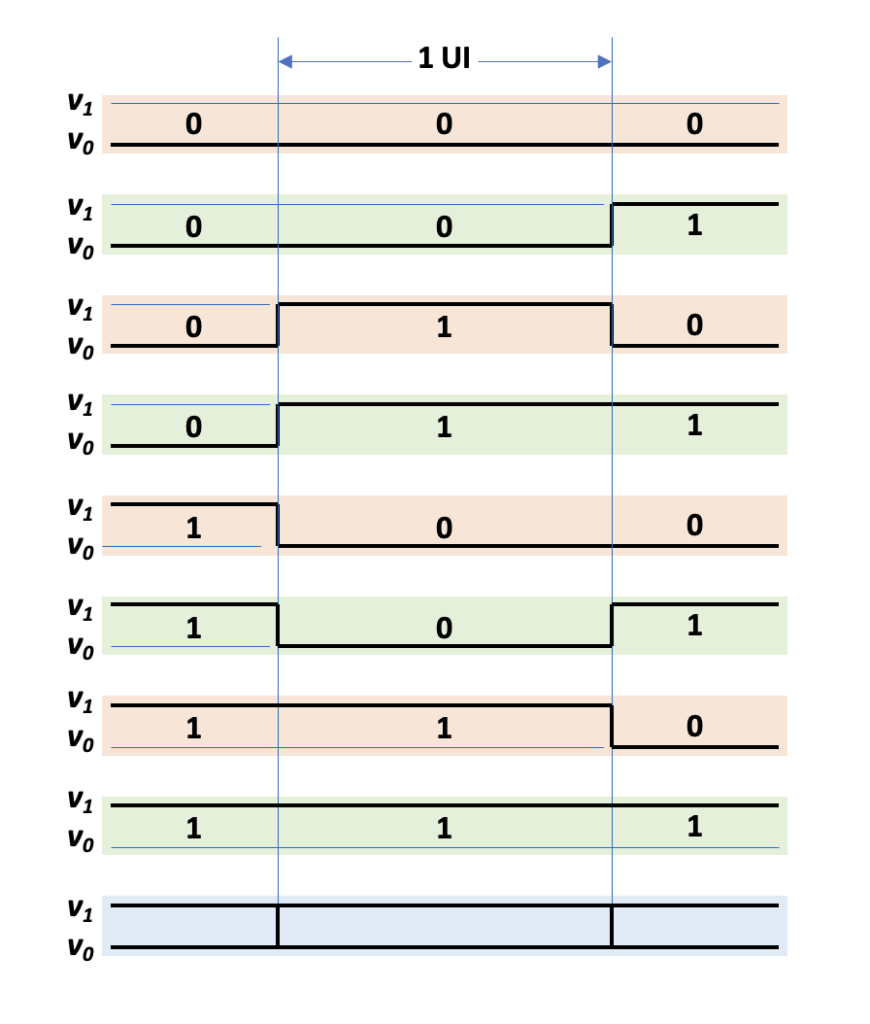
A: An eye diagram is a time-domain display of multiple unit intervals (UIs) overlaid on an oscilloscope screen, with one UI equaling half the period of the waveform being studied. For NRZ signaling, the waveform portion within a UI represents either a logic 1 (with voltage v1) or a logic 0 (with voltage v0), as Figure 1 shows. The waveform has several ways to traverse the UI: it can enter the UI as a 0, remain a zero, and exit as a zero (as shown at the top of the figure); it can enter as a 1, remain a 1, and exit as a 1; or it can transition at the beginning of the UI, the end of the UI, or both. Figure 1 shows all the possibilities, with the sequence shown essentially counting from 0 to 7 in binary. If we overlay multiple waveforms with at least one transition at the beginning and end of the UI, we get the eye diagram highlighted in blue at the bottom.
Q: That doesn’t look like the eye diagrams I’ve seen.
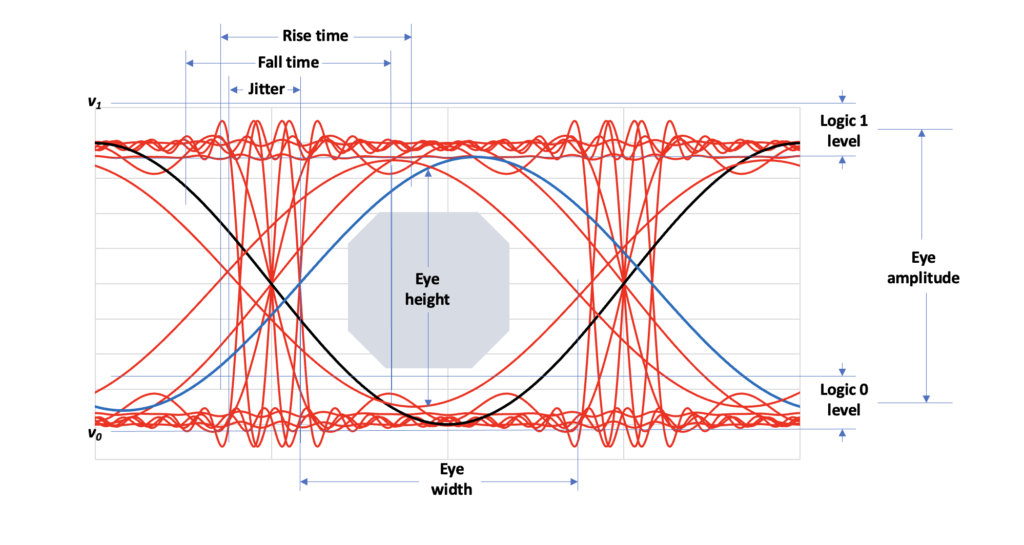
A: Right. In this idealized representation, the voltages always reach exactly v0 or v1, with the rise and fall times equaling zero. A real-world eye diagram looks more like Figure 2, where signal degradation results in the characteristic eye shape.
Q: What can we learn from the eye diagram?
A: We can measure jitter, or the time variations of the voltage midpoint crossings. We can also measure rise and fall times as well as the eye amplitude — the difference between the mean logic-high and logic-low levels. We can also measure the eye opening with respect to its height and width, and we can create a mask (shown by the gray polygon) from which valid signals are excluded.
Q: What’s the best way to trigger to establish a stable eye diagram?
A: Good question. We could trigger[1] on the data itself, which can be helpful in solving problems with inter-symbol interference (ISI). But if your data stream has long strings of all 0s or all 1s, you won’t see much, because there are no transitions to trigger on. Interfaces such as PCIe don’t have separate clock lines, but you can trigger on a clock derived from the data. To do that, you’ll need oscilloscope software that can handle the task or a separate clock-recovery hardware accessory.[2] You can also trigger on a mask violation, which lets you examine pre-trigger data to help determine what caused the violation. Some oscilloscopes and software options will also let you trigger on the protocol layer—for example, on encountering specific transaction-layer packets (TLPs) or data-link-layer packets (DLLPs).
Q: High-speed interconnect standards have specific error-rate specifications such as 10-12 (one error per trillion bits). For how long do I have to observe error-free operation on my eye diagram to be confident I am meeting the spec?
A: Unfortunately, there is no amount of time spent monitoring eye diagrams sufficient for guaranteeing a given error rate. An oscilloscope can capture thousands and thousands of UIs, but that represents only a subset all available UIs during a given time. To ensure compliance with a standard’s error-rate specification, you’ll need a bit-error-rate tester (BERT). In the final part of this series, we’ll look at the advantages and drawbacks of BERTs, and we’ll briefly address using semiconductor automated test equipment to evaluate chip-level interconnects.
References
[1] Anatomy of an Eye Diagram: How to Construct & Trigger, Tektronix
[2] Clock Recovery: Reliable synchronization for high-speed digital analysis, Keysight
Related EEWorld Online content
AI data center power distribution: part 1
What is PCIe gen 6 and how do I test it? Part 1
What is jitter and what can I do about it (part 2 of 2)?
PCI SIG release PCIe 7.0 specification
What you need to know about error analysis in PCIe 6.0 designs
Make the most of oscilloscope triggering: part 1